
Response strategies
An endpoint can hold several responses. The strategy, chosen under How should this endpoint respond?, decides which one is sent for each request.
| Strategy | Which response is sent | Typical use |
|---|---|---|
| Single response | Always the first | One fixed answer |
| Conditional rules | The first whose conditions all match the request | Success and error cases from one endpoint |
| Sequence (round-robin) | Each in turn, one per request | Retries and polling |
| Random / weighted | One picked at random, by weight | A flaky service |
Changing the strategy does not delete anything. Responses, conditions and weights are kept; the strategy only decides which of them are used. Point at a strategy button to read how it works.
Single response
The endpoint always sends its first response. Any other responses on the endpoint are ignored until you choose another strategy.
Example: a health check.
- Endpoint:
GET /health - Response: status
200, body{"status": "ok"}
Every call gets the same 200.
To add a second response from here, select Add another response (switches to conditional rules) under the card.
Conditional rules
Responses are checked from top to bottom. The first one whose conditions all match the request is sent. A response with no conditions is the fallback: it is sent when nothing else matches.
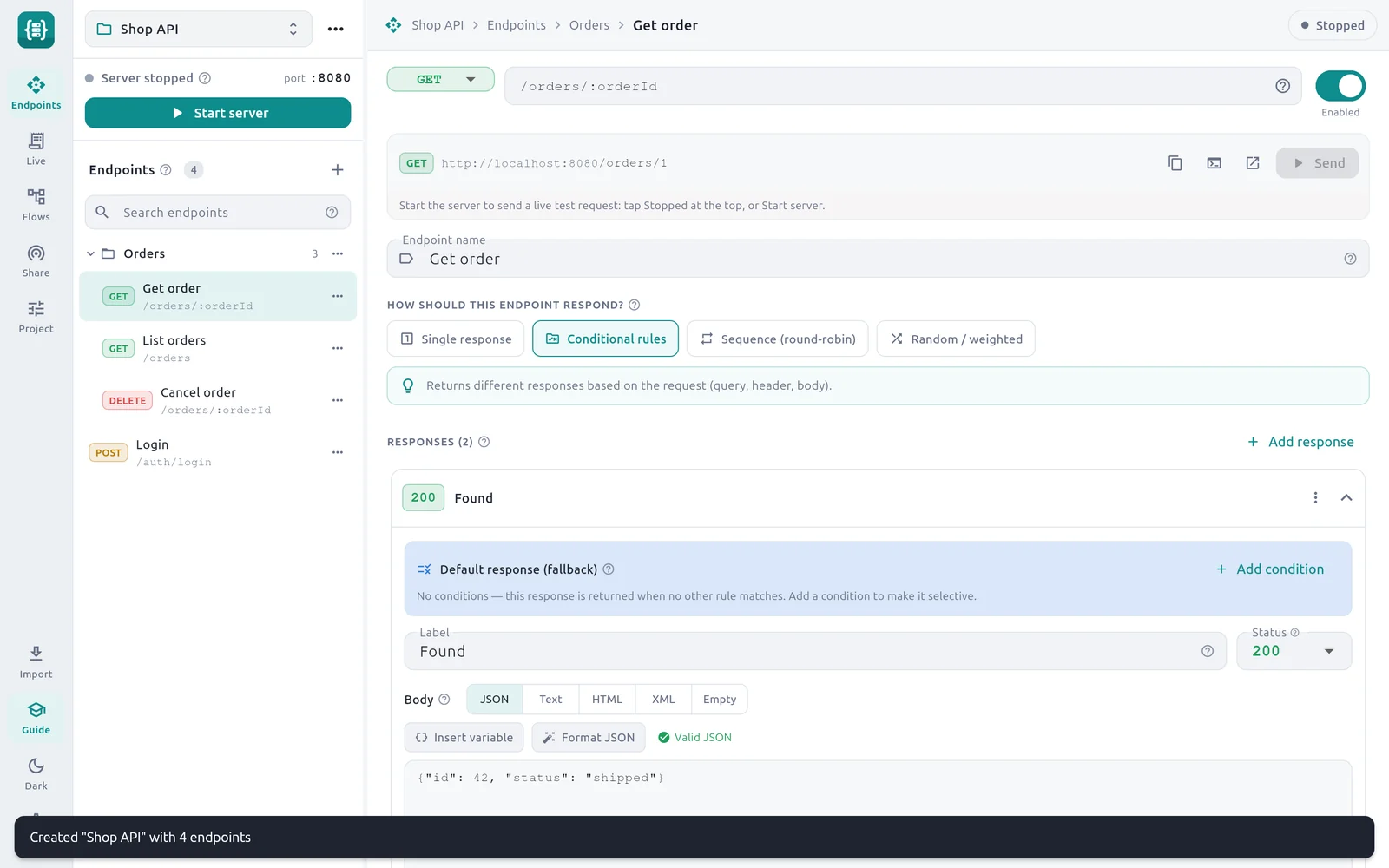
- 1Conditional rules — The selected strategy.
- 2Add response — Adds another response to the endpoint.
- 3Default response (fallback) — This response has no conditions, so it is the fallback.
- 4Add condition — Adds a condition and makes the response selective.
Example: a product lookup that can fail.
Endpoint: GET /products/:id
| Order | Label | Condition | Status |
|---|---|---|---|
| 1 | Not found | Path param id equals 999 | 404 |
| 2 | Out of stock | Query param stock equals none | 409 |
| 3 | Found | none (fallback) | 200 |
| Request | Response sent |
|---|---|
GET /products/999 | Not found, 404 |
GET /products/5?stock=none | Out of stock, 409 |
GET /products/5 | Found, 200 |
Conditional rules lists every source and operator and walks through the sample login endpoint.
Sequence (round-robin)
The responses are sent in order, one per request. After the last one, the endpoint starts again from the first. Each card shows its position number.
Example: fail twice, then succeed. This is the Retry sequence template.
Endpoint: GET /retry
| Position | Label | Status |
|---|---|---|
| 1 | Attempt 1 — fail | 503 |
| 2 | Attempt 2 — fail | 503 |
| 3 | Attempt 3 — success | 200 |
| Call | Status |
|---|---|
| 1st | 503 |
| 2nd | 503 |
| 3rd | 200 |
| 4th | 503 (the sequence starts over) |
Use it to check that your app retries a failed call, or to simulate a job that reports pending a few times and then done.
Things to know:
- One counter per endpoint. The position is shared by every client. If two apps call the endpoint, they take turns through the same sequence.
- The position is not saved. It starts from the first response again when you reopen Mock Studio.
- To repeat a status several times in a row, Duplicate the response.
Random / weighted
One response is picked at random for each request. Each response has a Weight; a higher weight makes it more likely. The chance of a response is its weight divided by the total of all weights. The minimum weight is 1.
Example: a service that fails about one time in five. This is the Flaky service (random errors) template.
Endpoint: GET /flaky
| Label | Weight | Status | Chance |
|---|---|---|---|
| Success | 8 | 200 | 8 ÷ 10 = 80% |
| Server error | 2 | 500 | 2 ÷ 10 = 20% |
Over many calls about 80% succeed. The choice is random each time, so ten calls will not give exactly eight successes.
Weights are relative. 8 and 2 behave the same as 4 and 1. Three responses with weights 3, 1 and 1 are chosen 60%, 20% and 20% of the time.
Use this strategy with Flows to see how your app or a test suite copes with intermittent errors. For exact, repeatable failures, use Sequence instead.
Combine a strategy with other features
- Every response can use placeholders, so a rule-selected
404can still echo the requested id. - Every response can have its own delay override or fault. A sequence of normal, slow, dropped is a quick resilience test.
- The Live section shows the label of the response that was sent, so you can confirm the strategy picked the one you expected.
Check yourself
Question 1 of 6
GET /products/:id uses Conditional rules with these responses, top to bottom. Which is sent for GET /products/999?stock=none?
1. Not found     Path param id equals 999       404
2. Out of stock  Query param stock equals none  409
3. Found         (no conditions)                200