
Full sync or light wallet server
Every Kilonova wallet syncs one of two ways, chosen when you create or restore it and changeable later. The choice decides how fast the wallet catches up and, more importantly, who learns what about your payments.
The two modes at a glance
| Full sync | Light wallet server | |
|---|---|---|
| Who scans the blockchain | Kilonova, on your device | The server |
| Keys sent anywhere | None | Your private view key |
| First sync | Slower | Fast |
| What the other side can see | Your IP address and when you sync | Every payment you receive, and usually when you spend |
| Can it spend your funds? | No | No; the spend key stays on your device |
Full sync
Kilonova downloads blocks from a Monero node and scans them on your device. Out of the box it uses one of the public community nodes bundled with the app, run by third parties, not by Dhiva Labs. You can add your own node under Settings, Nodes. See Nodes, proxy and Tor.
The node can see:
- your IP address, unless you use Tor or a proxy;
- when you sync and how much you download;
- a transaction you send, when you publish it, unless a proxy is set.
The node does not receive your keys and cannot tell which incoming transactions are yours. Running your own node gives the most privacy.
Each time a wallet starts syncing, Kilonova also asks one of the bundled public nodes for a recent block, to check that your node is on the same chain as everyone else. If they differ you see Your node's chain differs from another node's. It may be showing you a false chain.
Light wallet server (LWS)
A monero-lws server scans the blockchain for you, so syncing is fast. To do that it needs your private view key. With it, the server can see:
- every payment you receive and its amount, now and in the future;
- your IP address, unless you use Tor or a proxy;
- usually, when you spend, because it notices your coins being used.
When you send in this mode, the server also picks the decoys for your transaction and suggests its fee. Without a proxy it also publishes the transaction. It cannot spend your funds or see your seed.
Kilonova does not run a light wallet server and never picks one for you. Use one you run yourself, or one whose operator you trust.
Set up a server
Open Settings, then Light wallet servers.
Pick the network, type the server address in Server address, as host:port (https) or a full URL, and select Save.
The server must use
https. Plainhttpis allowed only for this device or an onion address, because the view key would otherwise travel unencrypted.Open the wallet. It shows This wallet will share its private view key with … before it can sync. Select Review and connect.
Read Share your view key?, which names the server. Select Share and connect to agree, or Cancel.
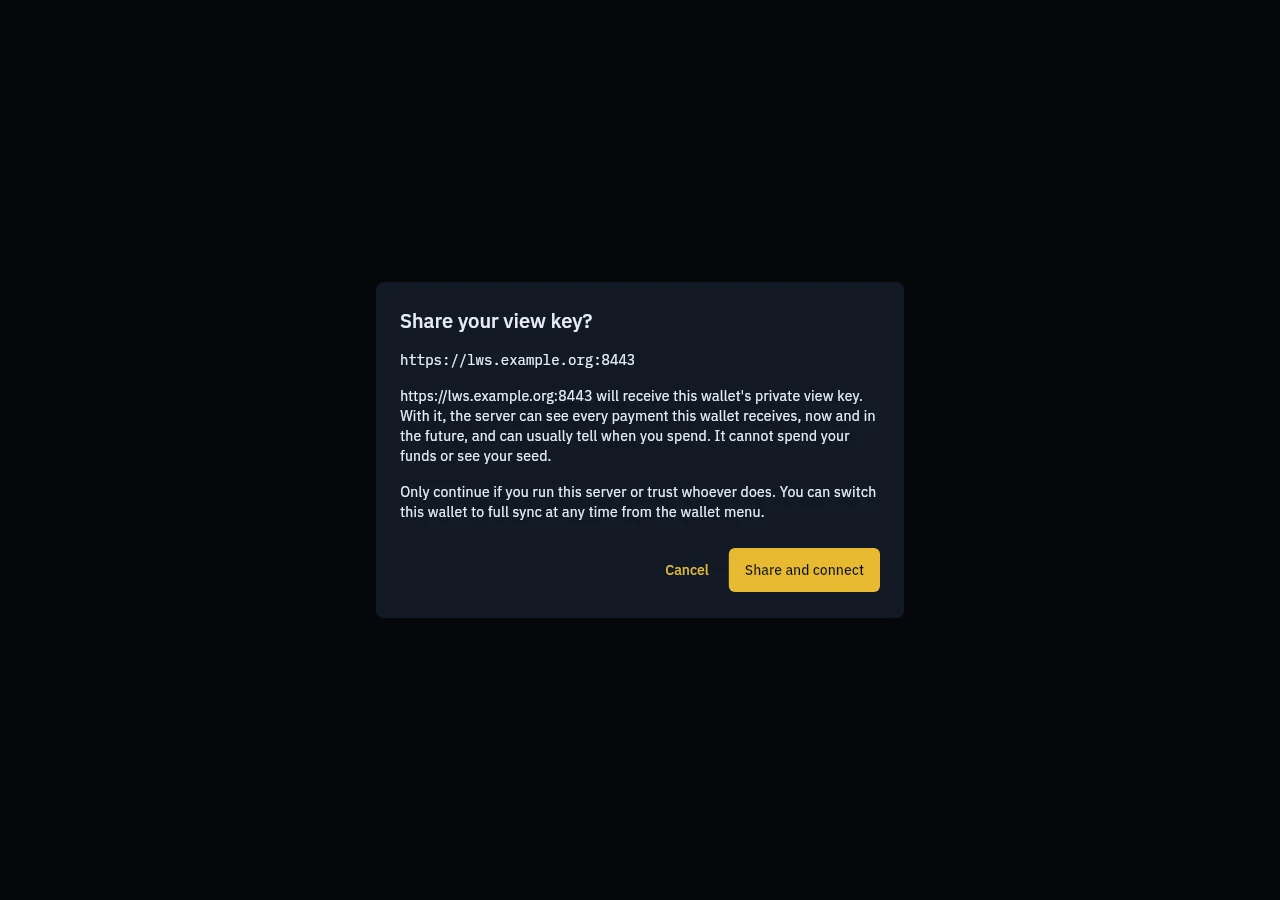
Your answer is remembered for that wallet and that server only. Choosing a different server asks again.
Checks Kilonova makes on the server
- Every payment the server reports is checked with your own keys. Payments that do not belong to the wallet are ignored, with the message The server reported … payments that do not belong to this wallet. They were ignored.
- Confirm the server's payments with a node is on by default, on the Light wallet servers screen. Kilonova asks your network's node for each transaction the server reports. Each lookup also asks for 7 other recent transactions, so the node cannot tell which one is yours.
Switch a wallet's mode
Open the wallet, then Wallet options.
Choose Switch to light wallet server or Switch to full sync.
Read Switch sync mode? and select Switch.
What has been scanned so far is cleared. Switching to full sync scans again from the restore height. A light wallet server you used keeps whatever data it already has; switching away does not delete the view key from it.
WARNING
Sharing a view key cannot be taken back. A server that has had your view key can keep watching payments to that wallet. If that matters, move the funds to a new wallet that uses full sync.
Which should I choose?
- Full sync if you want no keys to leave your device, and can wait for the first sync.
- Light wallet server if you run your own server (the project ships a self-hosting kit), or trust its operator, and want fast syncing on a phone.