
Beginner guide
You will create a wallet, write down its seed phrase, receive a payment and send one. Do it on stagenet first: it works exactly like the real network, but its coins have no value, so a mistake costs nothing.
What you need
- Kilonova installed. See Install.
- Pen and paper for the seed.
- To try receiving and sending: some stagenet coins from someone else, for example a public stagenet faucet. They have no value.
Words you will meet
- Seed (seed phrase): a list of 16 or 25 words that is the master key of the wallet. With it, the wallet can be rebuilt on any device.
- Node: a computer running Monero that Kilonova downloads blocks from.
- Block: a batch of transactions added to the blockchain about every two minutes.
- Address: what you give people so they can pay you. It is safe to share.
Choose stagenet
Open Kilonova. The Wallets screen opens.
In the Network switcher at the top, select Stagenet.
A strip reads Stagenet. These coins have no value. It stays on screen for every stagenet wallet.
Create a wallet
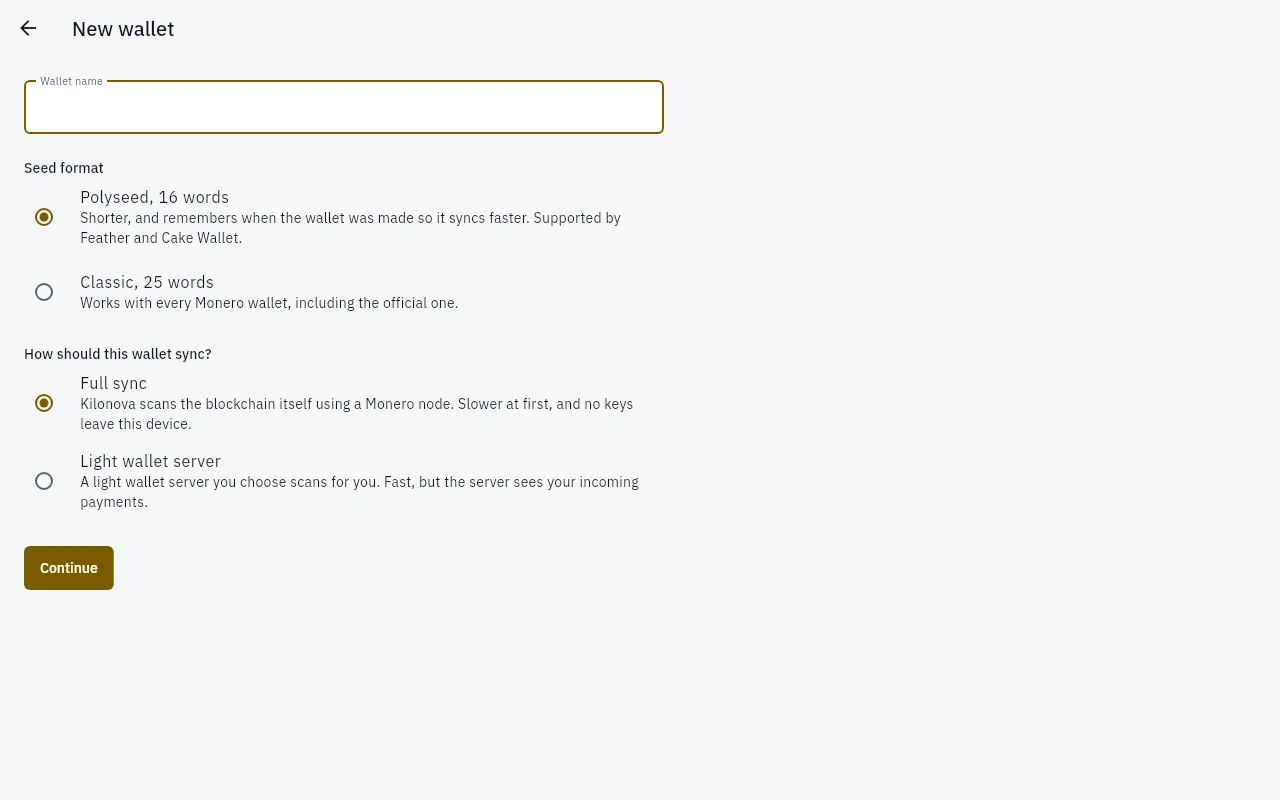
- 1Wallet name — A name for you. It is not shared.
- 2Polyseed, 16 words — Shorter, and remembers when the wallet was made.
- 3Classic, 25 words — Works with every Monero wallet.
- 4Full sync — Kilonova scans the blockchain itself. No keys leave the device.
- 5Light wallet server — A server you choose scans for you and sees incoming payments.
- 6Continue — Shows the seed next.
Select Create wallet (or the + button, then Create wallet).
Type a Wallet name, for example
Practice.Under Seed format, keep Polyseed, 16 words.
Polyseed records when the wallet was made, so a restore later is faster. Choose Classic, 25 words if you also want to open the wallet in Monero's official wallet.
Under How should this wallet sync?, keep Full sync.
With full sync, no keys leave your device. The other option is explained in Full sync or light wallet server.
Select Continue.
Write down your seed
The Write down your seed screen shows the words, numbered.
DANGER
Anyone who has these words can take every coin in the wallet, from any device, without your password. Kilonova and Dhiva Labs never see your seed and cannot recover it for you. If you lose the seed and forget the password, the funds are gone for good.
Write every word on paper, in order, with its number. Check the spelling.
Select I wrote them down.
On Check your seed, type the words Kilonova asks for, by number (for example Word number 7), then select Continue.
If a word is wrong you see That word does not match. Check what you wrote down. Fix your paper copy, not just the field.
How to keep the seed safe:
- Keep it offline: on paper, or stamped in metal. Do not photograph it, email it, store it in a notes app or cloud drive, or paste it into a chat or website.
- Store it where fire, water and other people cannot reach it. Some people keep a second copy in a separate safe place.
- Never type it into a site or app that asks for it "to verify" or "to fix" your wallet. That is how seeds are stolen.
Set a password
Type a Password of at least 8 characters, and type it again in Confirm password.
The password encrypts the wallet on this device only. It cannot be recovered; the seed is the backup.
Select Create wallet.
The wallet opens and starts syncing. The status line goes from Starting sync to Scanning block … of … and then Synced, block ….
Receive a payment
In the wallet, select Receive.
You see the Main address as text and as a QR code.
Select Copy, or let the other person scan the QR code.
Give the address to whoever is paying you, for example a stagenet faucet.
When the payment reaches the network, the wallet shows +… XMR waiting for a block. After it is in a block it appears under History. Received coins can be spent after 10 blocks, about 20 minutes; until then the history marks them Locked.
TIP
Select New address to make a separate address (a subaddress) for each person who pays you, with a label such as their name. All addresses belong to the same wallet and seed, and payers cannot tell that two of your addresses are linked.
Send a payment
Wait until the wallet shows Synced, then select Send.
In To, paste a stagenet address with Paste, or use Scan a QR code (Android) or Read a QR code from an image (desktop).
Type the Amount.
Leave Fee on Normal. A higher fee only helps when blocks are full.
Select Review.
Kilonova shows Choosing decoys and signing. Nothing is sent yet.
On Check before sending, read the lines: the recipient and amount, Network fee, Leaves this wallet and Change back to this wallet. They are read from the signed transaction itself.
Select Send now and confirm with your password, or with your fingerprint or face if you turned on biometric unlock.
You see Sent. It confirms when the next block is mined. The payment shows as Pending in History until then.
WARNING
Monero payments cannot be reversed. Check the address on the Check before sending screen. On mainnet, send a small amount first when you pay a new address.
What you learned
- Stagenet lets you practise with coins that have no value.
- The seed is the only backup of your funds; the password only protects this device.
- Receive shows your address; Send builds, shows and only then publishes a transaction.