
CloudDrop
CloudDrop uploads everything you put in one folder to your own cloud storage, keeps the same folder structure there, and never deletes anything in the cloud. You can then remove local copies to free disk space and download them back when you need them.
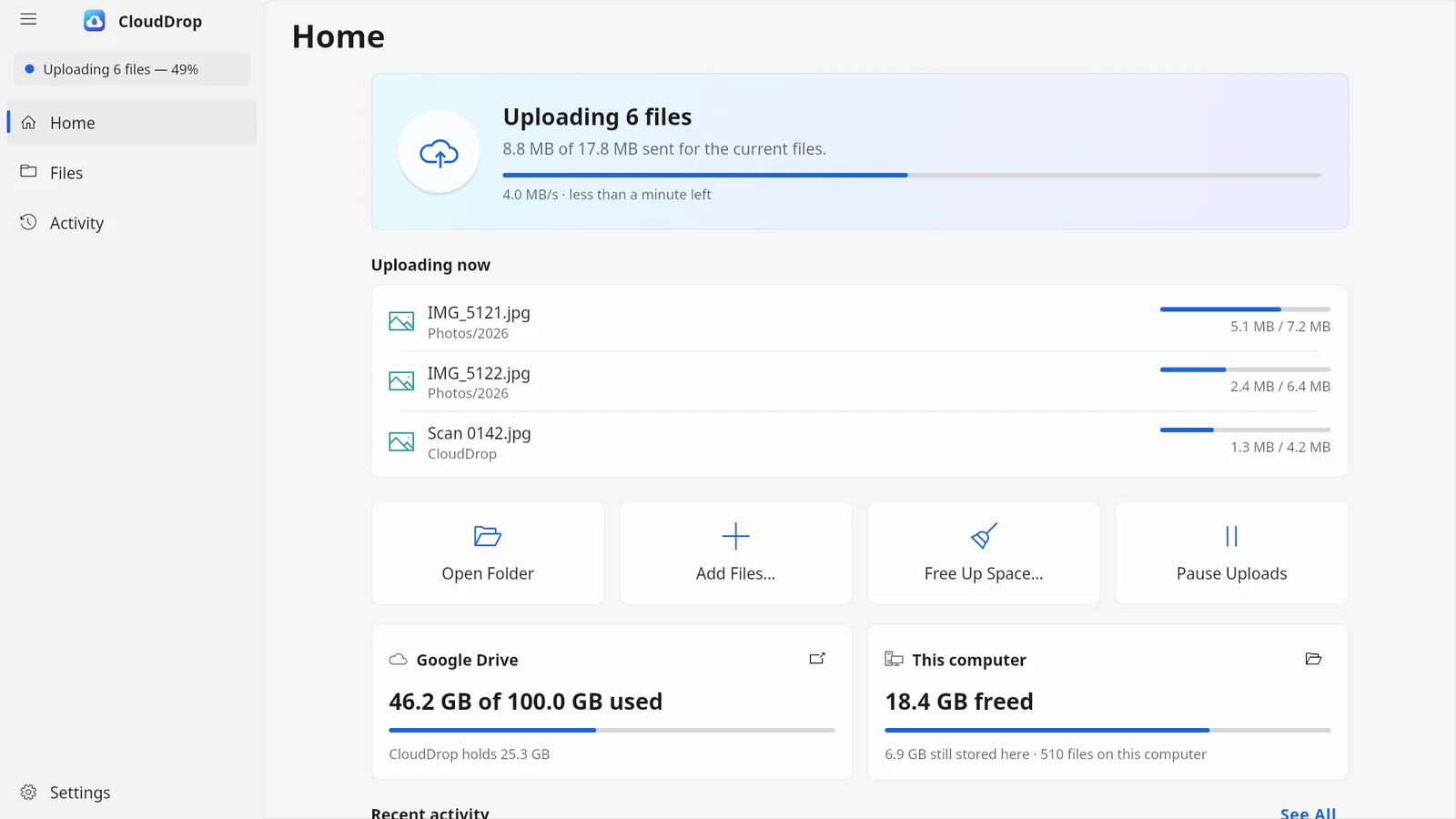
- 1Status — What CloudDrop is doing right now, shown on every page.
- 2Pages — Home, Files and Activity. Settings is at the bottom.
- 3Status card — Overall progress, upload speed and time left.
- 4Uploading now — The files going up at this moment.
- 5Free Up Space… — Removes local copies of uploaded files after checking the cloud copy.
- 6Pause Uploads — Stops uploading until you resume.
- 7Cloud storage — How much of your cloud storage is used.
- 8This computer — How much disk space CloudDrop has freed here.
What it does
- Uploads new and edited files from your CloudDrop folder (
~/CloudDropon Linux,%USERPROFILE%\CloudDropon Windows). - Keeps your folders. The same structure appears in the cloud. Renames and moves are applied there without uploading again.
- Never deletes in the cloud. Deleting a file on your computer makes it cloud-only: it stays in the cloud and stays listed in CloudDrop.
- Frees disk space by hand or automatically, and only after it has checked that the cloud holds an identical copy.
- Resumes large uploads after a network drop, a restart or a crash.
- Handles several folders, each uploading to a cloud of its own.
CloudDrop is upload-only. It is not a two-way sync tool: it sends your local files to the cloud and brings a file back only when you ask for it.
Who it is for
People who want a safe copy of a folder in the cloud and more free space on a small disk, without the risk that a local delete also removes the cloud copy.
Clouds it uploads to
| Cloud | How you sign in | Status in 0.3.1 |
|---|---|---|
| Google Drive | Browser | Released since 0.1.0 |
| OneDrive | Browser | Tried on a real personal account |
| Dropbox | Browser | Tried on a real account |
| Nextcloud, other WebDAV | App password | Preview |
| S3-compatible storage | Access key | Preview |
| SFTP | SSH key or password | Preview |
| MEGA | Email and password | Preview |
"Preview" means the cloud is built and tested against test servers, but had not yet been tried with real accounts when 0.3.1 was released. See Connect a cloud.
Platforms
- Linux: a desktop app, a top-bar icon and a background service. The PPA build also adds status icons and right-click actions to the GNOME Files app.
- Windows 10 (version 1809 or later) and Windows 11: a desktop app, a notification-area icon and a cloud folder in File Explorer with Explorer's own status icons.
Privacy
Files go straight between your computer and your cloud. Dhiva Labs runs no server for CloudDrop. CloudDrop asks each cloud for as little access as it allows: on Google Drive only the files it creates itself, on OneDrive and Dropbox only its own app folder.